🚨 Breaking
தினமும் காலையில் வெறும் வயிற்றில் சாப்பிட வேண்டிய 5 ஆரோக்கியமான உணவுகள் இதோ! நீண்ட ஆயுள் தரும் ரகசியங்கள் | Healthy Breakfast Tips in Tamil 2026 RRB ALP Recruitment 2026 Tamil – Massive 11,127 Vacancies Out! Official Notification, Salary ₹19,900, Apply Online Direct Link புளூமூன் பௌர்ணமி வழிபாடு 2026: பேரதிர்ஷ்டம் தரும் நீல நிலவு ஆன்மீக பரிகாரங்கள் | Blue Moon Rituals Tamil 🔥 UPSC Direct Recruitment 2026: 194 காஸெட்டட் வேலை! ₹1,77,500 சம்பளம் | Apply Online! SBI & Bank of Baroda Recruitment 2026 |பட்டதாரிகளுக்கு மாபெரும் வங்கி வேலைவாய்ப்பு! 12,150 காலிப்பணியிடங்கள்! ஜூன் 1 முதல் இந்த 3 ராசிக்காரர்களுக்கு “புதாதித்ய யோகம்” ஆரம்பம்! குபேரனைப் போலப் பணமழையில் நனையப்போவது யார்? 2026 ஜோதிட கணிப்பு | Tamil Budhaditya Yoga Palangal தொப்பையை குறைப்பதே தனி கலை! கோடையில் உடல் எடையை அசுர வேகத்தில் குறைக்கும் 5 நீர்ச்சத்து நிறைந்த தமிழ்நாட்டு பாரம்பரியக் கீரைகள் 2026! | Tamil Weight Loss Greens வெயில் காலத்தில் மண்பானைத் தண்ணீரில் ‘இந்த’ ஒரு பொருளைப் போட்டு குடிங்க… ஏசி (AC) இல்லாமலே வீடு ஜில்லுனு மாறும்! 2026 தமிழ் வீட்டு வைத்தியம் | Clay Pot Water Cooling Tricks

Restore CPanel Accounts Using The Transfer Option In WHM

📅 March 2, 2022 👁 109 ⏱ 4min read
Restore CPanel Accounts Using The Transfer Option In WHM

How to Restore cPanel Accounts using the “Transfer Table of ContentsHow to Restore cPanel Accounts using the “TransferRestore CPanel Accounts Using The TransferRelated Articles: The following article explains how to restore cPanel accounts using the…

📚 உள்ளடக்க பட்டியல்

How to Restore cPanel Accounts using the “Transfer

The following article explains how to restore cPanel accounts using the “Transfer” option in WHM.

Following are the steps to restore cPanel accounts using the transfer option:

Restore CPanel Accounts Using The Transfer

ADSENSE CODE

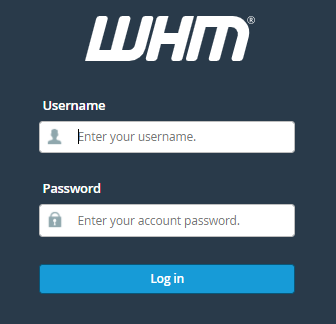
1. Log in to your WHM account.

Restore CPanel Accounts Using The Transfer Option In WHM

2. Find the “Transfers” option from the left-hand side menu.

Restore CPanel Accounts Using The Transfer

transfers Thedalweb Restore CPanel Accounts Using The Transfer Option In WHM

3. Select the “Transfer or Restore a cPanel Account” sub-option.

transfers or restore Thedalweb Restore CPanel Accounts Using The Transfer Option In WHM

4. Let the “Restricted Restore” option be checked.

5. Select the “Transfer Option”.

Transfer Option Thedalweb Restore CPanel Accounts Using The Transfer Option In WHM

6. Transfer or Restore a cPanel Account.

7. Make the settings according to your requirement.

Transfer or Restore Thedalweb Restore CPanel Accounts Using The Transfer Option In WHM

8. Assign the IP address to the account.

9. Now, hit the “Restore” button.

Restore Thedalweb Restore CPanel Accounts Using The Transfer Option In WHM

 கணினி வலையமைப்பில் ஃபயர்வால் அறிமுகம்

That’s it! This was the end of the discussion. Hope you liked our article. Always feel free to contact our support@saravanabhava.in

NOTE: We only allow VPN Server to be run on services such as Virtual Private ServerSemi-DedicatedCloud Hosting, and Dedicated Servers. Please contact our Sales Department to get a quote about the servers.

#Restore CPanel Accounts Using The Transfer Option In WHM

Watching Youtube Channel :Thedalweb

Related Articles:

How to setup multiple networks with one router

This article explains 3 different options by which you can setup multiple networks with one router. As there are two different networks, two IP networks are required. We assign this as 192.168.1.0/24 and 192.168.2.0/24. It is assumed that there are 10 users each on both networks.

firewall
கணினி வலையமைப்பில் ஃபயர்வால் அறிமுகம்

Firewall என்பது நெட்வொர்க் பாதுகாப்பு சாதனமாகும், இது வன்பொருள் அல்லது மென்பொருள் அடிப்படையிலானது, இது உள்வரும் மற்றும் வெளிச்செல்லும் அனைத்து போக்குவரத்தையும் கண்காணிக்கிறது மற்றும் வரையறுக்கப்பட்ட பாதுகாப்பு விதிகளின் அடிப்படையில் அது குறிப்பிட்ட போக்குவரத்தை ஏற்றுக்கொள்கிறது, நிராகரிக்கிறது அல்லது குறைக்கிறது.

Router மற்றும் Modem இடையே உள்ள வேறுபாடு

Router என்பது ஒரு நெட்வொர்க்கிங் சாதனமாகும், இது உங்கள் மோடமிலிருந்து மொபைல் இணைப்புகள், மடிக்கணினிகள், டெஸ்க்டாப் கணினிகள் மற்றும் ஸ்மார்ட் டிவிக்கள் போன்ற உங்கள் எல்லா சாதனங்களுக்கும் உங்கள் இணைய இணைப்பை விநியோகிக்கும் (அல்லது வழிகள்). இது அனைவரையும் ஒரே நேரத்தில் இணையத்துடன் இணைக்க உதவுகிறது. 

🔥 மேலும் படிக்க